
How to use the LoongBuy Spreadsheet, step by step
Keep your product choice, order record and shipping decision connected. The screenshots below are historical official examples; use your account for the current interface and totals.
1. Find and save the exact item
Browse the Spreadsheet or search for a product name. Open the result and original seller listing. Save the link, colour, size and quantity; compare measurements and recent item-specific feedback before proceeding.
Seller and sizing checklist →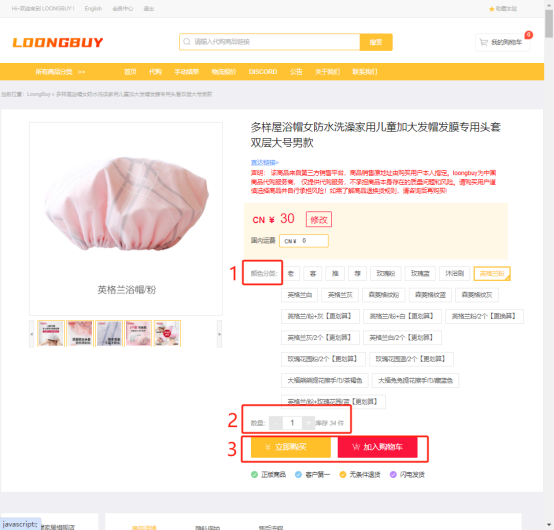
2. Review the order and first payment
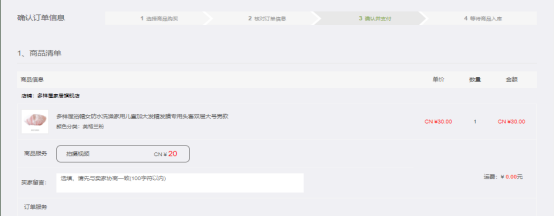
Create or sign into your LoongBuy account. Paste the seller link into the official search. If it cannot import, use the manual order route and state the specifications clearly. Review the item price and domestic shipping; international shipping is paid later. Check your account messages for any required additional payment.
Order changes and additional payments →When the link needs a manual order, fill the gaps before paying.
An item URL may open in a browser while failing to import into the agent form. Keep the original link and prepare the title, seller, selected variant, unit price, quantity and domestic delivery charge. A reference picture helps identify the item, but it does not replace the option names or tell the buyer which displayed price applies.
Suppose a listing sells a plain shirt and a heavier version under one title. “Black, medium” still leaves a choice unresolved. Include the fabric/version label exactly as shown, then check that the purchase confirmation reflects it. If the listing uses a minimum batch quantity, calculate the goods line using that quantity before approving payment.
A seller clarification or an additional-payment message is a new decision point. Compare it with what you authorised: did the price, option, quantity or domestic freight change? Resolve the difference in the official account rather than assuming an earlier estimate remains valid.
3. Compare the arrival with your listing
When the item is stored, open the warehouse information and QC photos for that order. Compare the size label, colour, quantity and visible condition with the listing. Request a specific close-up or measurement when needed. A warehouse check does not authenticate goods or test every function. If a visible issue needs action, check the return deadline promptly.
Return eligibility and timing →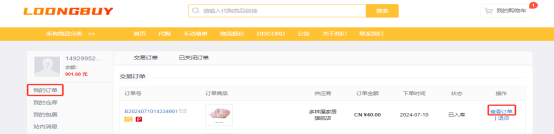
4. Choose the parcel and shipping route
After resolving item questions, select the goods you want to ship. Confirm the delivery address, available routes and packing needs. An optional rehearsal estimates the parcel; formal submission starts packing. The final charge depends on the packed weight and dimensions and the applicable route. Keep the tracking record after dispatch.
Rehearsal and submission explained →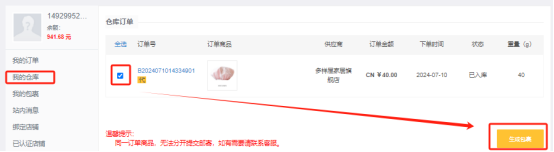
Keep the two payment stages separate
The first payment covers the purchase and domestic delivery. The international parcel is a later decision. Compare the current shipping quote, payment conversion, optional services and any destination charges before approving it.
How to use the search: enter a product name and compare the matching listings. The official agent search is where you paste a seller link. For a photograph without a product name, use the image-search control on the official agent site and compare the result with your reference.
Get help at the right stage →Prefer a video walkthrough?
The video linked by the official LoongBuy homepage introduces the buying process. Treat any example prices or interface labels as illustrative and follow your current account controls.
Watch the LoongBuy tutorial video →